Physical Address
304 North Cardinal St.
Dorchester Center, MA 02124
Physical Address
304 North Cardinal St.
Dorchester Center, MA 02124

Tech News, Advice and Tutorials
Tech News, Advice and Tutorials
From startups to enterprises, customer experience has taken a center stage in the business world. It plays a significant role in consistent business growth and success.
Customer service portals are the primary resources that provide customers with all the information and help them resolve their queries without assistance from the customer support team. This centralized portal is like a go-to platform for customers when they encounter problems. In fact, 84% of customers prefer using customer portals over speaking to a customer support agent.
Customer service portals empower customers to be self-reliant and independent. Being available for customers 24*7, these portals enhance customer satisfaction and build their loyalty to the brand.
WordPress is one of the best content management systems to develop a customer service portal. It is easy to set up and secure. It offers multiple compact and user-friendly choices for website themes.
WordPress also offers countless plugins and widgets for website customization and helps with SEO. All these features make it the best choice for creating your customer service portal.
This article shares the ultimate checklist of customer service portal must-haves. Read on to find out more.
In simple words, a domain is the address or location of a website on the internet that helps users locate it with ease. Like the company website, the customer service portal needs to have a unique domain address so that it can be easily accessed by customers.
There are two ways in which you can set up a domain address for the customer service portal.
Subdomain helps in separating the website into various sections. It can be an entirely different website. For example, many companies use a subdomain for their careers site or the company blog.
We have also used a subdomain to host our support forum.

Subfolders (also referred to as subdirectories) work like traditional file storage systems. Every folder contains some web pages that are a part of the website.
The Themely blog is an example of a subfolder system.
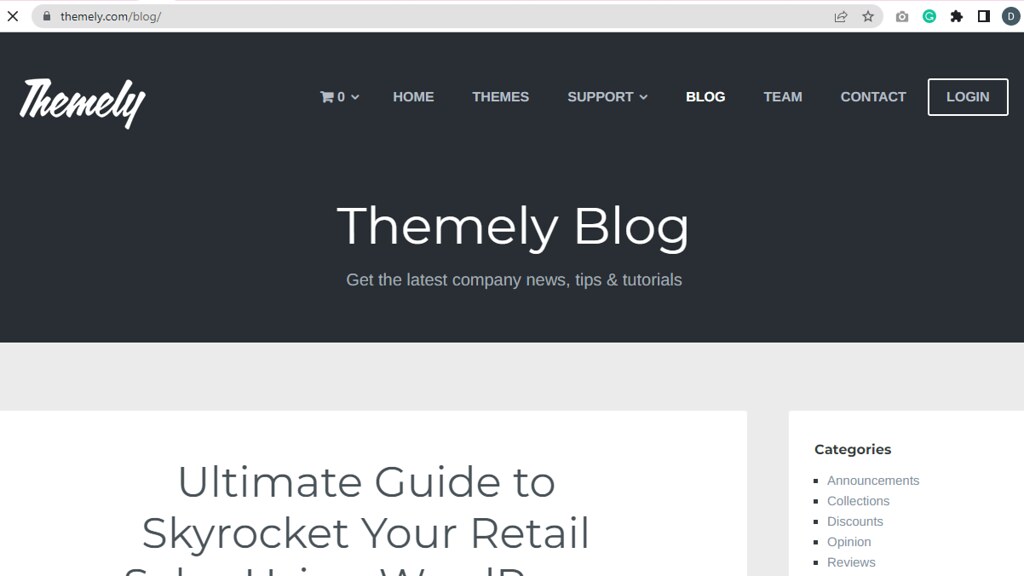
Choose the desired naming system for the customer service portal while considering customer experience and website SEO.
Choose a relevant theme from among the list of available themes. Customize the look and feel of the customer portal per your brand theme. WordPress themes by Themely are professional-looking and easy to customize.
Here are a few considerations when choosing the best theme for the customer service portal.
Based on the industry and audience you cater to, design a customer service portal that provides customers with product information, step-by-step tutorials, FAQs, and more.
An effective customer service portal consists of the following pages. Customize these pages according to your requirements to provide exceptional customer service.
The portal must contain a compact contact form that customers can use to submit queries, requests, or feedback without any hassles. Contact forms protect the email inbox from spam messages. It provides customers with a direct means to connect with the business by providing all the essential information.
WordPress offers many plugins for installing contact forms on websites. These plugins can be configured to send these messages to your email inbox.
To prevent such messages from landing up in the spam count on a customer service software like Hiver. The platform integrates with the email inbox seamlessly to deliver crucial customer messages to you on time. This smart Gmail add-on helps you handle all customer or visitor conversations seamlessly without the loss of any information.
FAQs offer a quick resolution to customer queries, thereby ensuring enhanced customer experiences. Instead of spending time answering emails or responding to comments or messages on social media, set up an FAQ page on the customer service portal and save your customer support team’s time.
A well-written FAQ page contains short and sharp answers to customer questions and are presented in a clean layout. Here is an example of one of the best FAQ pages.
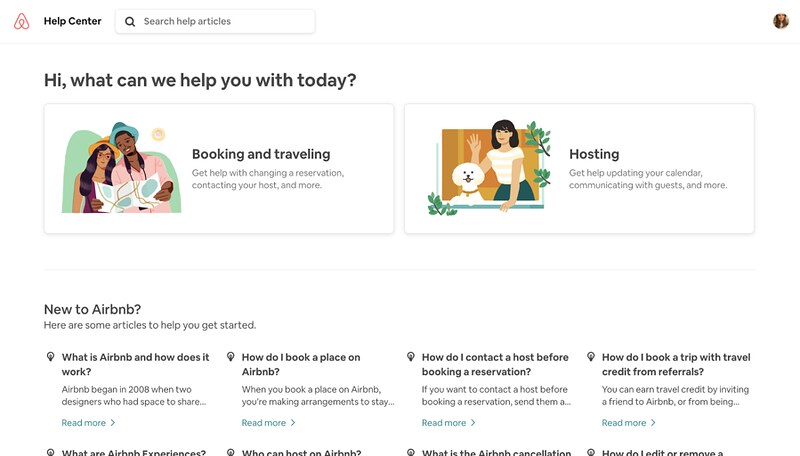
So, what should you include in the FAQ page?
The knowledge base is an online library of information about a product or service. It offers customers access to detailed content in the form of guides, tutorials, troubleshooting tips, manuals, glossaries, and other helpful information.
A knowledge base converts your customer service portal into a self-service one, thereby reducing the number of support tickets. Being accessible to customers 24*7, it helps you deliver the best experience to the customers.
Follow these tips to create an informative and engaging knowledge base.
Having a customer service portal does not necessarily mean handling customers on your own. Start an online community forum where customers can reach out and interact with one another for collaboration, advice, and support.
An online community forum will encourage knowledge sharing among customers, thereby reducing the pressure on customer support teams for resolving queries. These forums could also be great a medium for sourcing user-generated content and topic ideas, thus creating a strong knowledge base. It will certainly help in streamlining the customer journey with your brand.
Live chat is yet another must-have for customer service portals. It helps deliver quick answers to customer queries and assist them with their problems.
Live chat support enables you to foster long-term relationships with customers by providing them with real-time support. Around 42% of customers prefer live chat as it offers them a hassle-free way to reach businesses.
Here are a few things to remember when configuring your live chat.
The customer service portal aims at delivering enhanced customer experiences. Hence, understanding what your customers feel about the same is essential.
Capture customers’ opinions using feedback questionnaires, exit-intent popups, star ratings, suggestion boards, and more. This feedback will help you understand what your customers like and dislike and aid you in improving your offerings.
Collecting customer feedback lets your customers know that you value their opinions and creates the best customer experience. It boosts customer satisfaction and helps in retaining customers.
Here are a few best practices to follow when collecting customer feedback.
Here is an example of a short survey by Evernote.
Although the customer support portal helps customers with finding answers to their questions, you must provide them with a solution to connect with the support team seamlessly.
As certain queries may require a high level of support, the support team must be easily reachable. They must have access to customer information, chatbot conversations, purchase history, and more so that they can assist without any difficulties. This will ensure the timely resolution of queries that could otherwise result in customer dissatisfaction.
Determine the cause of the escalated issue and take measures to resolve them. Always keep the customers updated about the issue resolution status. Focus on creating positive experiences by training the support team to be empathetic towards the customers.
SEO is essential for customer service portals as it determines its visibility on search engines, thereby ensuring that customers find it with ease. WordPress offers a few amazing plugins to optimize the site for SEO. YoastSEO is one among them.
WordPress SEO plugins can help in –
These were some of the must-dos for developing a seamless customer service portal. Use this checklist as a guide for building a customer portal that wows your audience. So go ahead and build a fully-functional and informative portal that provides the right information at the right time.


